

Subscription Total
₹1,740
Note: Assisted setup remote configuration is provided within 24 hours of successful order checkout.
Accounting & GST
GSTR Import for Tally
Code: AB10 3 Active
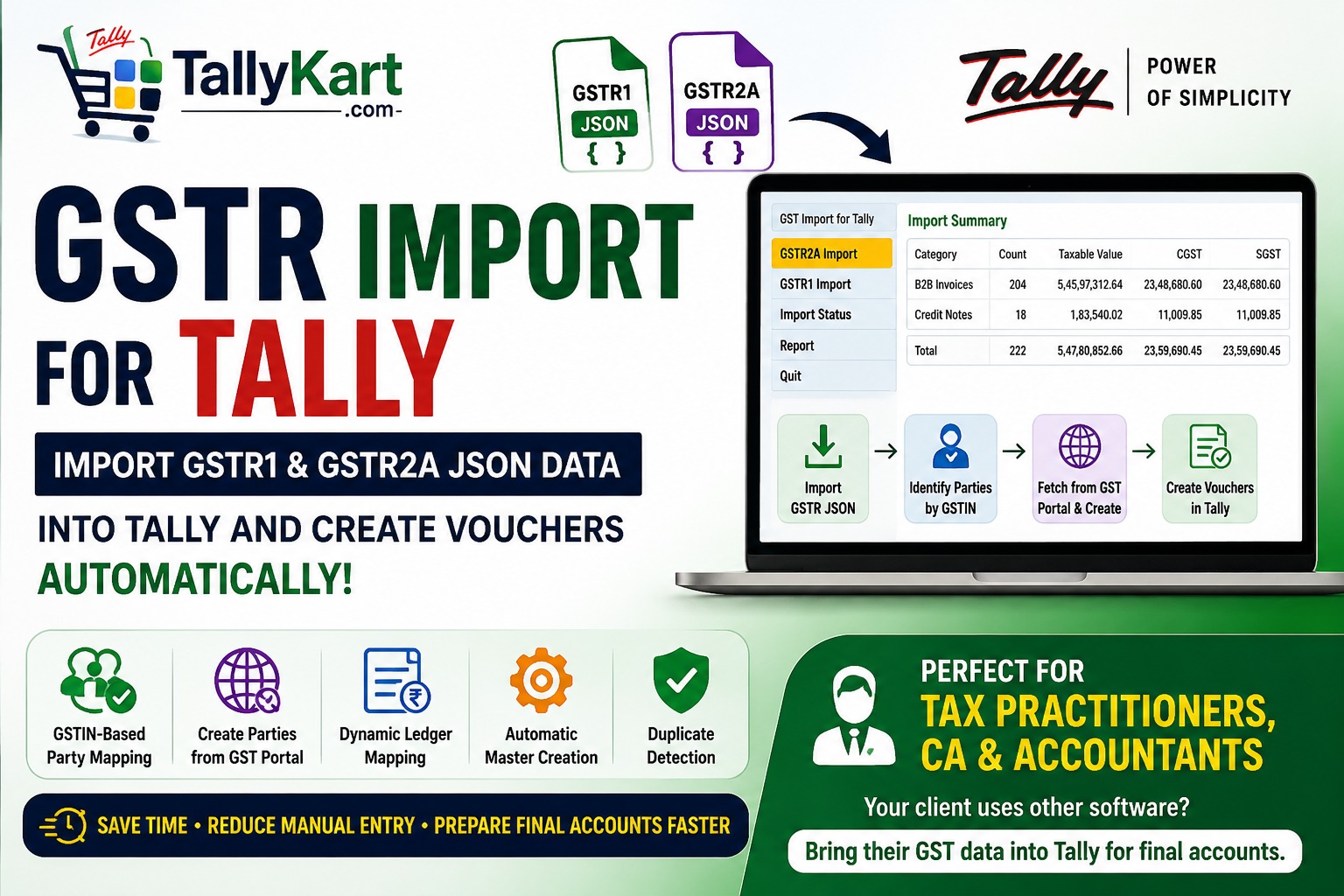
Import GST data into Tally for hassle-free final accounts preparation. Import GSTR1 and GSTR2A JSON data into Tally, map GSTIN-based parties and ledgers, automatically create missing masters, and generate vouchers for final accounts preparation.
Verified Publisher
Remote Installation Included
Expert Assisted Setup
Free Updates included
Email & Phone Support
Publisher: TallyKart.com
Current Version: v1.1
Release Date: August 27, 2026
Last Updated: September 30, 2026
GSTR Import for Tally
GSTR Import for Tally is a professional GST data import solution designed especially for Chartered Accountants, tax practitioners, GST consultants and accountants who prepare and maintain their clients' final accounts in Tally, while the clients use other billing or accounting software for day-to-day invoicing and GST filing.
Instead of manually entering hundreds of transactions into Tally, import the available GST return JSON data and create the corresponding Tally vouchers through an easy-to-use mapping and import workflow.
The module provides a controlled Review → Map → Create → Import → Verify process, allowing you to review GST data, identify the required masters, map existing masters, create missing masters and finally generate vouchers in Tally.
Designed for Tax Practitioners
Many businesses use dedicated billing or accounting software for their sales and purchase transactions, while their tax practitioner maintains the final accounts in Tally. In such cases, obtaining and entering all the transactions manually into Tally can be time-consuming.
GSTR Import for Tally helps bridge this gap by converting available GST return data into Tally accounting entries, making it easier to prepare and maintain books in Tally even when the client's operational software is different.
Key Features
- GSTR1 Import – Import sales-related GST transaction data from GSTR1 JSON files into Tally.
- GSTR2A Import – Import purchase-related GST transaction data from GSTR2A JSON files into Tally.
- JSON Data Preview – Review the GST data and transaction details before starting the import process.
- Voucher Type Mapping – Map the transaction types identified in the GST data to the appropriate Tally voucher types.
- Automatic GSTIN-Based Party Identification – Existing Tally party ledgers are automatically identified by matching the GSTIN available in the imported GST data.
- New Party Identification – For parties that do not already exist in Tally, the mapping screen displays the available GSTIN so that the practitioner can decide how to create the party.
- Fetch Party Details from GST Portal – Click the Create option for a new party to fetch the available party information from the GST Portal using the GSTIN.
- Automatic Party Ledger Creation – Create the new party ledger in Tally using the information retrieved through the GSTIN.
- Configurable Parent Group – Create new parties under the appropriate Tally group, such as Sundry Debtors or Sundry Creditors.
- Ledger Mapping – Dynamically identify the accounting and tax ledgers required based on the transaction values and GST data, and present the relevant ledgers for mapping.
- Automatic Master Creation – Create required masters automatically after the user accepts the selected mapping and creation options.
- Duplicate Voucher Detection – Identify previously imported vouchers and prevent duplicate entries during subsequent imports.
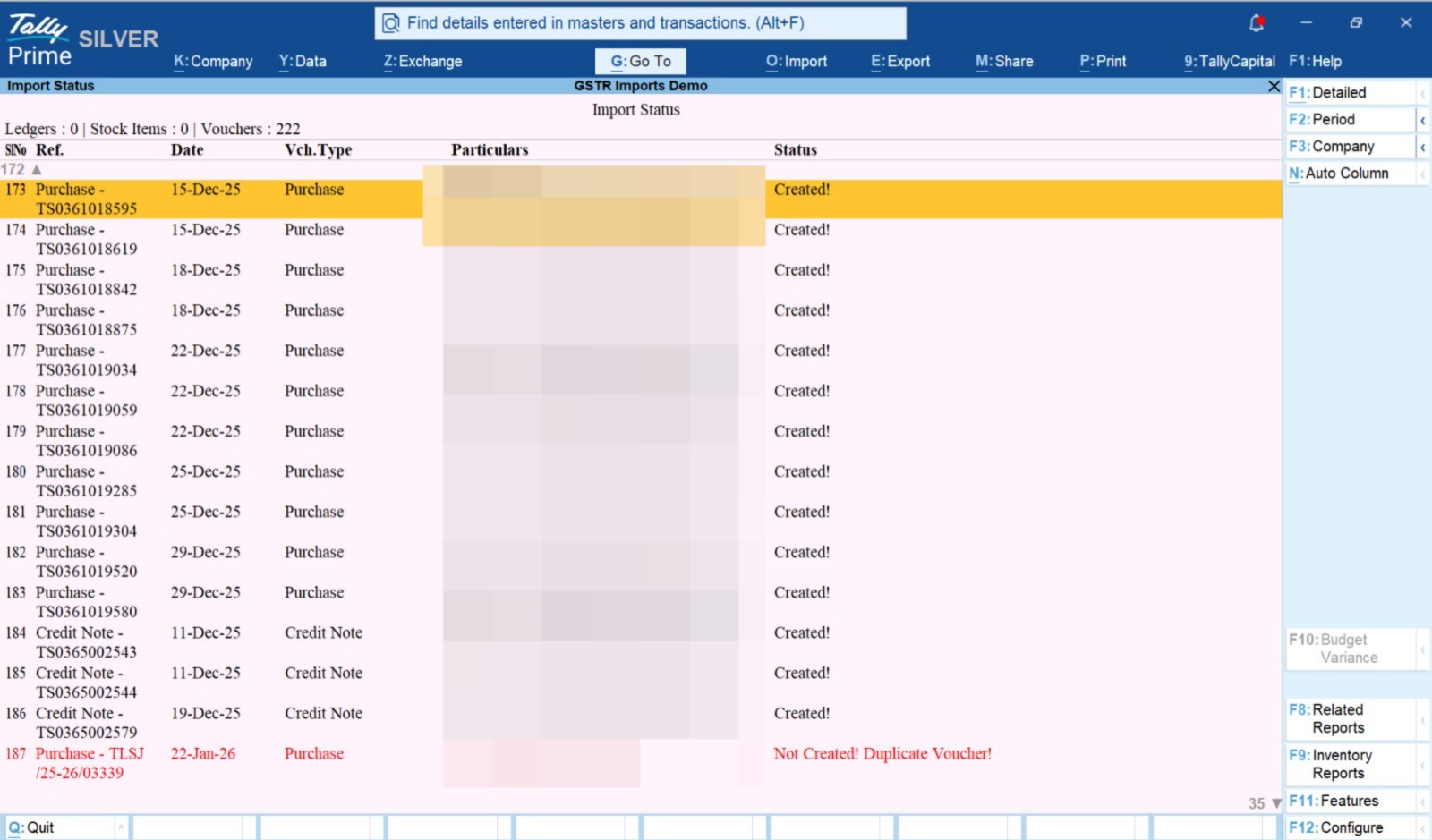
- Detailed Import Status – View voucher-wise results after import, including successfully created and skipped or duplicate vouchers.
Simple Import Workflow
- Enable the Module – Enable the required GSTR import options from Module Settings.
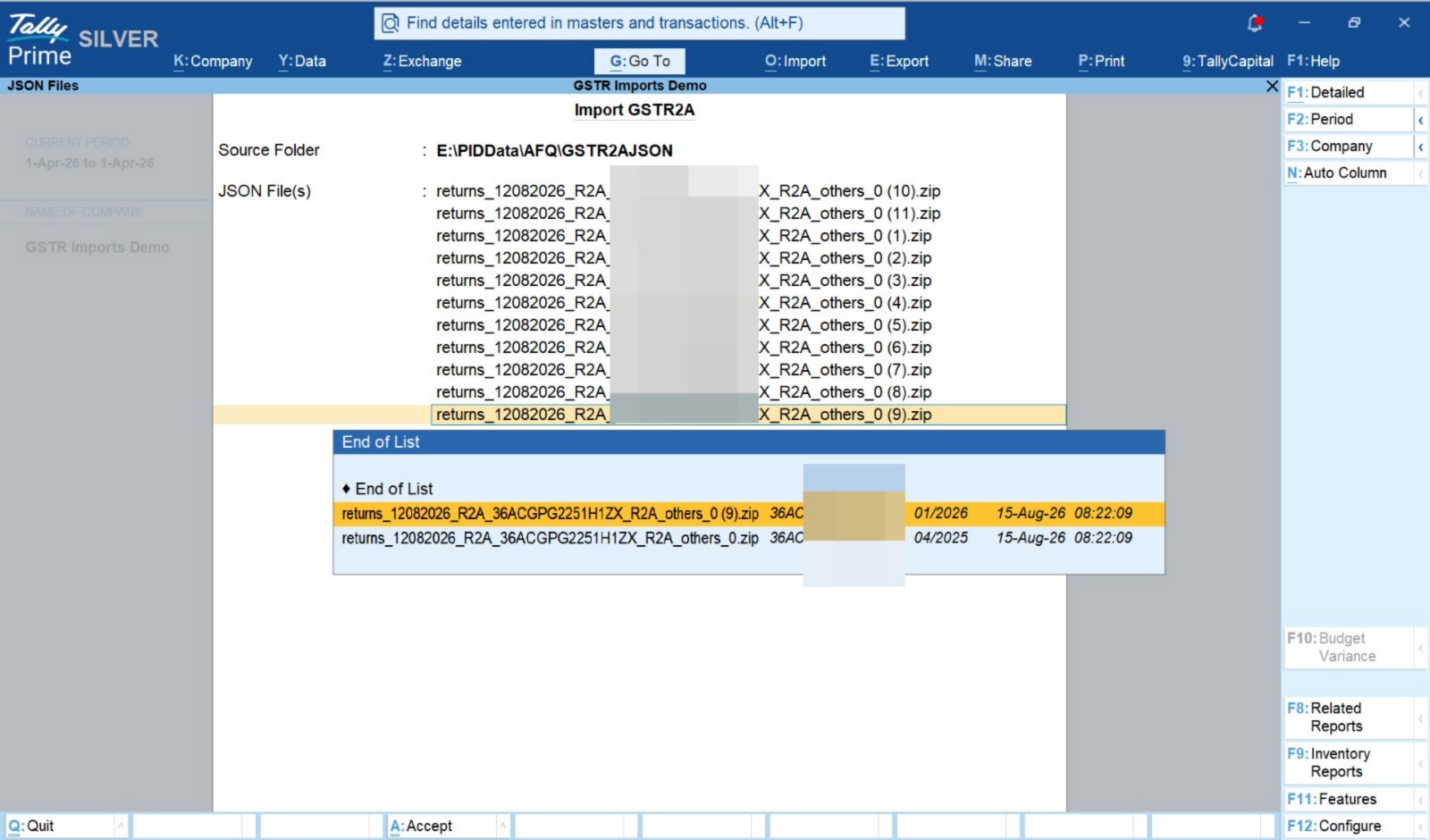
- Select GST JSON – Select the required GSTR1 or GSTR2A JSON files.
- Review GST Data – View the transactions and GST information identified from the selected JSON files.
- Start Import – Click Import to analyse the GST data and identify the masters required for voucher creation.
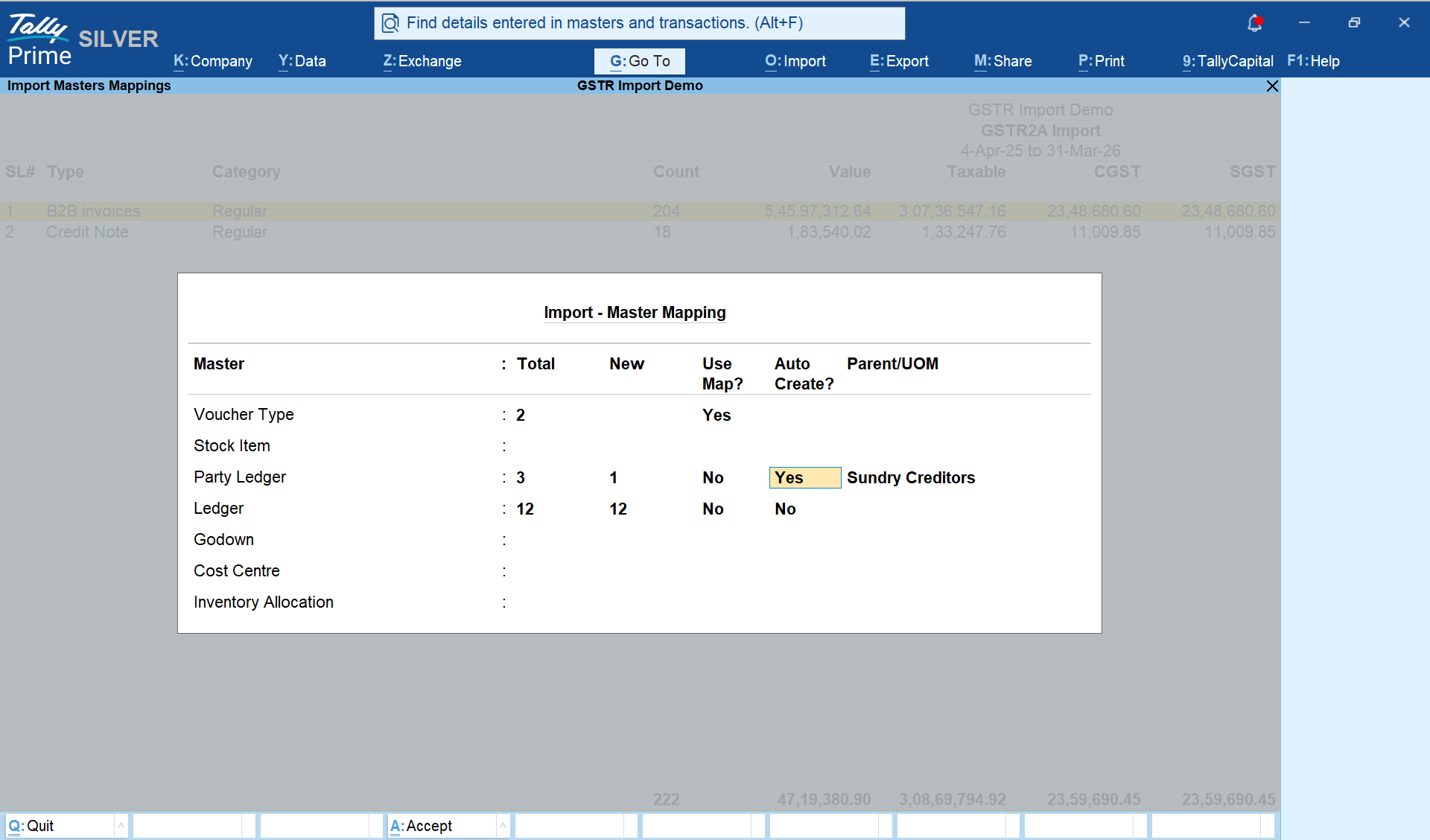
- Map Voucher Types – Map the GST transaction types to the corresponding Tally voucher types.
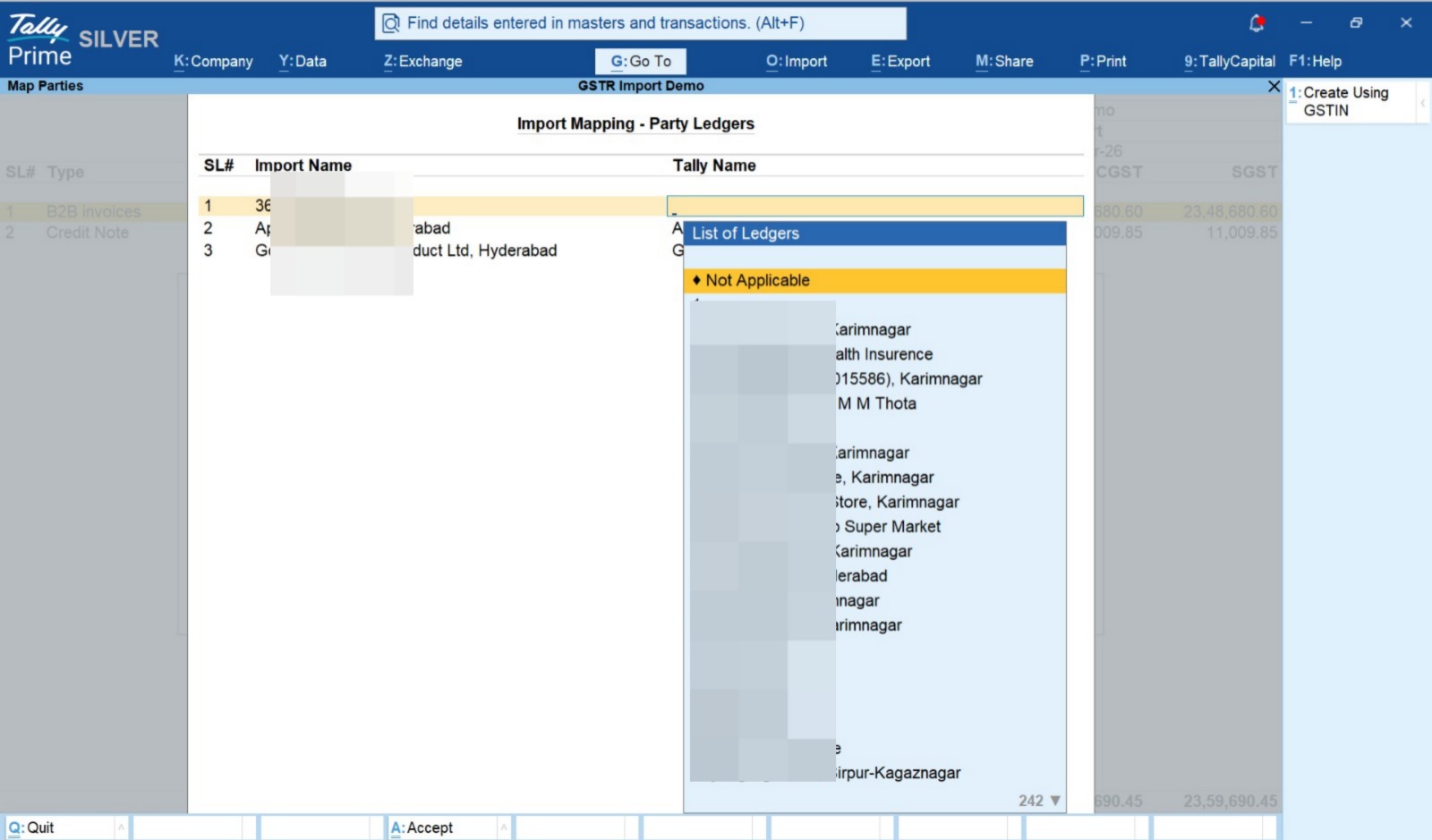
- Map Parties – Existing parties are automatically identified using GSTIN. Unmatched parties are displayed with their GSTIN.
- Create New Parties – Click Create for a new party to fetch available details from the GST Portal and automatically create the party ledger.
- Map Ledgers – Map the dynamically identified purchase, sales, tax and other accounting ledgers required by the imported transactions.
- Accept Master Mapping – Review and accept the master mappings and creation options.
- Create Vouchers – The module automatically creates the corresponding accounting vouchers in Tally.
- Verify Import Status – Review the final voucher-wise import status and identify created, skipped or duplicate entries.
GSTIN-Based Party Automation
Party mapping is one of the key features of the module. The GST JSON provides the GSTIN associated with the transaction. The module uses this GSTIN to automatically identify whether a corresponding party ledger already exists in Tally.
When an existing party is found, it can be used directly without manually searching for the ledger. When the GSTIN does not match an existing party, the new GSTIN is displayed in the mapping screen.
The practitioner can then click Create to fetch the available party information from the GST Portal and create the corresponding Tally ledger, significantly reducing manual master creation.
Dynamic Ledger Mapping
The module analyses the imported GST data and dynamically identifies the accounting and tax ledgers required for the transactions. Only the relevant ledger mappings need to be addressed, making the mapping process simpler and more practical for large imports.
Ideal For
- Chartered Accountants
- CA Firms
- Tax Practitioners
- GST Practitioners
- Accountants
- Tax Consultants
- Accounting Professionals managing multiple client companies
Typical Use Case
Client uses other billing software → GST Return Filed → Download GST JSON → Import into Tally → Identify Parties by GSTIN → Create Missing Parties from GST Portal → Map Ledgers → Create Tally Vouchers → Prepare Final Accounts
Save Time on Manual Data Entry
GSTR Import helps reduce repetitive manual entry when maintaining client accounts in Tally from GST return data. GSTIN-based party identification, GST Portal-based party creation, dynamic ledger mapping and automatic voucher creation make the process faster and easier to manage.
Duplicate detection and the detailed import status report also help practitioners review the outcome of each import and safely handle repeated imports.
Client doesn't use Tally? No problem. Bring their GST data into Tally and simplify final accounts preparation.
GSTR1 & GSTR2A Import
Import GST return JSON data directly into Tally.
GSTIN-Based Party Mapping
Automatically identify existing Tally parties using the GSTIN available in the JSON.
Create Parties from GST Portal
For new parties, fetch available details from the GST Portal using GSTIN and automatically create the Tally ledger.
Voucher Type Mapping
Map GST transaction types to the appropriate Tally voucher types before import.
Dynamic Ledger Mapping
Automatically identify the accounting and tax ledgers required based on the imported GST data.
Automatic Master Creation
Create required party and other masters with minimal manual effort.
Pre-Import Data Review
Review imported GST transactions and values before creating vouchers.
Automatic Voucher Creation
Generate Tally vouchers automatically after accepting the master mappings.
Duplicate Voucher Detection
Identify previously imported transactions and avoid duplicate voucher creation.
Import Status & Verification
View voucher-wise import results, including created, skipped and duplicate entries.
Since our premium solutions interact directly with your TallyPrime database schema, TallyKart provides custom remote configuration. We verify your order and handle the configuration remotely for you.
01
1. Add to Cart
Add the solution subscription to your cart or click Order Now.
02
2. Complete Payment
Proceed to checkout and complete the billing details.
03
3. Order Verification
TallyKart verifies your company license details.
04
4. Support Contacts You
Our certified agent calls you to schedule installation.
05
5. Remote Setup
We remotely install and configure the solution on your system.
06
6. Go Live!
Your premium solution becomes fully active and ready to use.
Tally Versions
TallyPrime
Supported Editions
Silver (Single User), Gold (Multi-User)
Operating Systems
Any
System Prerequisites
Licensed Tally Installation & internet for remote setup
Minimum Required: TallyPrime
Current Version: v1.1
v1.1Latest ReleaseSeptember 15, 2026
- Updates in this release
- 1. General bug fixes
- 2. Vouchers imported summary in import status report, which shows all the imported vouchers in columnar.
- 3. Option to compare imported vouchers with json source
Reviews
Loading reviews...
Write a Review
Share your experience with other TallyPrime users.
Log in to write a review.
Related Solutions


Lock Vouchers after e-Invoice / e-Way Bill Generation
AB20Stops alteration, deletion and cancellation of vouchers once both the e-Invoice and e-Way Bill are generated, so your Tally data always matches the GST portal. Set it up by voucher type and user.
- Automatic lock
- Optional delete & cancel block
- Generate the pending one
